
The Switronix Recon can send a Tally signal wirelessly back to the camera.
The Switronix Recon can send a Tally signal wirelessly back to the camera.
I recently purchased a Switronix Recon Ultra wireless video system. One feature that lead to my purchase decision of the system over competing units was the "Tally Return" feature on the units. Though not listed as a feature in product descriptions; many product photos included the clearly visible "Tally" connectors on the units, and an online review mentioned the feature. A product manual was not available from the manufacturer's website; but as a "lower cost" unit, this wasn't surprising. I decided to try the unit, with the ability to return it should it fail to perform.
When I received the unit, the included manual made no mention of the connectors on the units, let alone any information on their use or functionality. The "Transmitter" (that normally mounts on a camera) has a 3.5mm [1/8"] connector cabled "Tally Out", and the "Receiver" (that would connect to a monitor and/or video switcher/mixer) has a 3.5mm [1/8"] connector cabled "Tally In". I called Switronix, and I was very happy when my call was answered immediately (and directly without going through a robot) by a friendly customer service rep who promised to email me some information on the tally feature as it was a "new feature" and documentation was not yet available. Sure enough I received an email a few minutes later informing me that the connectors are Mono connectors and the cable would depend on the tally connector on my camera. Needless to say, this was far short of useful information for use of the Tally feature, so I went to my engineering bench and pulled out a couple of connectors and a multimeter.
The following are my experimental findings; I take no responsibility for their accuracy nor any damage caused by use of this information.
The Tally signal on the Recon appears to be a simple on/off status signal sent "backwards" as a "return" from the Recon Receiver to the Recon Transmitter.
Pinouts are as follows:
I made a cable to adapt from a tally/GPI connector standard I've devised using common XLR-3 connectors [Pin 1 = Ground, Pin 2 = +12V DC, Pin 3 = Tally (low/ground on signal)] to a 3.5mm connector. I use this standard to interface to various devices such as video switchers that commonly use sinking (connect to ground) tally outputs. I connected a simple test button I have that shorts Pin 1 and Pin 3 of the XLR to "send" a Tally signal into the Recon. This lit the LED I still had connected to the Transmitter.

Test button and adapter cable to send tally to the 'Tally In' connector of the Switronix Recon Receiver
Lighting an LED at the camera can work well as a Tally light for the operator in many situations, and I have successfully deployed LED's Velcroed & taped to monitors/cameras/teleprompters many times in the past. However, often you want to do more; like trigger the internal tally systems of a video camera.
Converting the +3.3V tally output signal from the Recon Transmitter to a "switch to ground" signal can be done simply a safely using a device called an "opto-isolator" which is basically an LED pointing at a light-sensor built into a single component. As the signal passes within the component as light, there is electrical isolation between the circuits which prevents damaging currents to flow between devices. The input of the opto-isolator draws very little current and I'd be amazed if the output of the Recon's Tally Out wasn't up to this. The output of the opto-isolator also only switches a very small amount of current, but can be used to drive a transistor and then even a relay should larger currents need to be switched.

The opto-isolator is triggered by the 3.3V from the Switronix Recon Transmitter's Tally Out and safely switches on a 2nd circuit.
I was interested in triggering the internal Tally circuit of a Panasonic AG-HPX370 camcorder from the recon. Panasonic does something really cool and provides a tally in/out interface on the Hirose "DC Out 12V" connector on the back of the camera, normally used to power radio-mic receivers or other accessories. When the camera is recording, it provides a sinking (connect to ground) signal on pin 2 of this connector, lighting a lamp (or LED with resistor) supplied with 12V from pin 4. However if you connect pin 2 of this connector to pin 1 (ground), the camera registers this as a Tally input and lights the camera's Tally lights and shows a small red circle "Tally" icon in the viewfinder & LCD display.
For reference: Pin 3 of this connector functions as a record trigger by shorting it to ground on pin 1 so you can use this connector to build a remote "record" button with indicator light. You could use an opto-isolator to, instead of driving tally, drive these pins as a remote "record start/stop" button over the Recon for remote-start in a Steadicam situation. Remote start/stop is common in Steadicam use to allow the operator to not disturb the frame to start the camera. In multi-cam Steadicam use, the Tally signal could be used to drive the Tally light at the Steadicam's monitor instead of the camera.
I wired up the output of my opto-isolator between pins 1 and 2 of a Hirose connector for connection to the camera in "Tally In" mode.
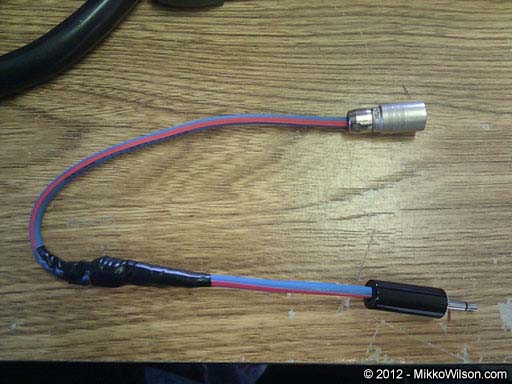
Complete Tally cable assembly from a 3.5mm mono connector through an opto-isolator (wrapped in electrical tape to a re-enforcing wire) into a Hirose 4-pin connector for connection to a Panasonic camcorder.
I used the cable to connect from the Tally Out connector on the Recon Transmitter mounted to the camera into the Hirose on the back for the camera. A right-angle 3.5mm connector would be better, but I didn't have any on hand. I used a small piece of Velcro to secure the cable.
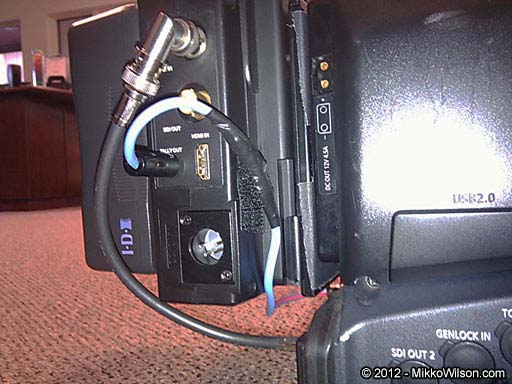
Cable from the 'Tally Out' connector on the Switronix Recon Transmitter secured with Velcro.
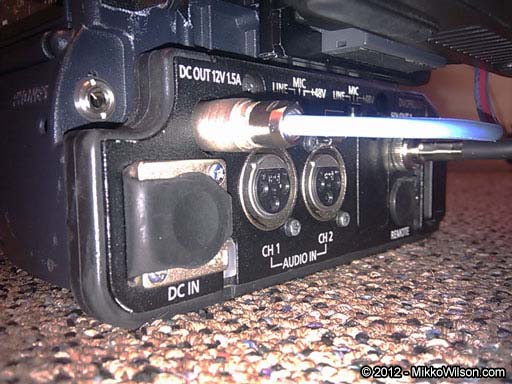
Tally cable connected to the 4-pin Hirose connector on a Panasonic AG-HPX370 camcorder.
I pressed the test button connected to the receiver, and hey presto! The tally lamps and on-screen icon on the camera lit up as expected. I hooked up the Recon Receiver into a video mixer's SDI input, and matching Tally output using an existing XLR-3 breakout cable wired to my standard and tested. When the camera (through the Recon wireless link) was selected on the mixer, sure enough the tally lights lit on the camera. With the camera on my shoulder in handheld mode, as it will often be used with the Recon, I have a working tally indicator in my eyepiece with no modifications to the camera. Cool!
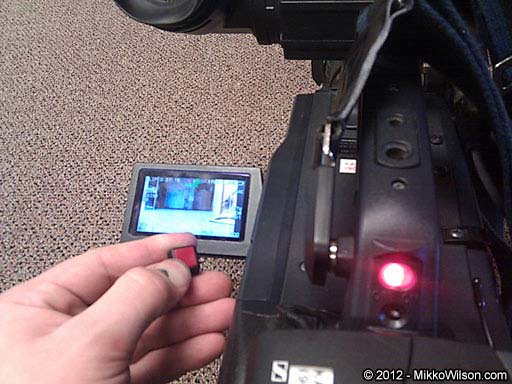
Testing the Tally return on the Switronix Recon: Pressing a button connected to the Tally In on the Receiver sends a signal back through the Tally Out on the Transmitter and triggers the Tally lights on the camera's body and on-screen display.
Obviously full documentation of the Tally feature on the Recon system is sorely lacking and should be supplied by the manufacturer, not only with the product, but also on their website (or even on the unit itself) for engineers who may need to interface with the system. Hopefully this documentation will be made available in the future.
A serial data return channel allowing for full CCU remote control of the camera would be a fantastic addition as the Recon system uses 2-way communication between the camera and the base. However the Tally feature is extremely useful; and while it could be achieved with a separate radio system, built into the Recon is very handy. Add a wireless com system of your choice (best left separate of the camera link to allow for communication in the case of a lost link) and you're all set with all you need to run a wireless camera in a multi-camera environment.
I experimented with what happened when I took the camera out of range and the Recon lost connection: the Tally lamps on the camera remained lit. I believe when the link is lost, the Tally simply remains in its current state until the link is restored and a change in Tally state is sent. I didn't test if the Tally would check and update its status on restoration of the link, or it would simply remain on until the Tally signal was next turned off after the link was restored. I think a handy update for the unit could be the option to blink the Tally output on the Recon Transmitter as a warning to the operator when the link was lost.